Showing posts with label 2009. Show all posts

Sunday, April 5, 2015

Budgeting in AX 2009 - Overview

Budget Allocations

AX has the ability to use predefined allocation rules to perform generated allocations. Generated allocation is the distribution of posted or fixed amounts to combinations of destination accounts and dimensions at any time, for which system generates new Journal entries distributing the amount based on an allocation formula.

Allocation can be set by various methods in Ax, which includes:
- Basis
- Fixed percentage
- Fixed weight
- Spread even

The Allocation process in the system is divided into 3 segments.
  • §  Ledger allocation rules definition
  • §  Process Allocation request
  • §  Allocation Journal.


Ledger Allocation Rules definition: - The first step in allocation is to define the allocation rules.
Creation of allocation rules requires the allocation code, allocation validity as Start Date & End Date. Then, select one of the allocation methods as fixed percentage, Basis, Fixed Weight, Spread even.
After selecting the allocation method, define the Rules for the Source Ledger account. Source Ledger accounts and dimensions can be selected where the expenses has been incurred.
Define the destination account & dimensions where the amount needs to be allocated. Also define the actual percentage or Basis based on which source amount should be allocated to destination. Once destination is defined the Ledger allocation rules are completed.

Process Allocation: -Once the Ledger Allocation rules are defined, the unique rule code will be generated. Refer the rule code in process allocation request to process the allocation entries (based on the allocation rules the system will reallocate the cost to the respective department.)
After selecting the rule code, provide start date and end date of rules and reason codes with remarks. Process the Allocation request and this generates the financial entries in allocation journal.
The allocation process collects one or more values from a source data record and distributes the totals of the values to one or more accounts or account and dimension combinations according to an allocation rule that is defined using the Ledger allocation rule form.

Allocation Journal: -Allocation journal shall show the entries passed by Process Allocation step. System would generate the entries on running the Allocation request. System shall reverse the Source Ledger a/c and book the entries against destination ledger accounts as per the allocation rule.

Budgets


Budgets are defined for each Chart of Accounts dimension wise, where dimension can be a Category/cost center/department/projects/sub department which are identified as Dimensions.

AX supports budgets to be created at the General ledger level. The budgets are maintained at the chart of account level with relevant dimension and the variance analysis will be made at the chart of account level.

Sales and Purchase Budgets:


The budgeting for sales and purchases is carried out in the Accounts Receivable & Accounts Payable module and the same will be transferred to GL. However the accounts that are affected during the transfer are only the Sales revenue accounts and the purchase inventory accounts.

The sales and purchase forecast can be entered by quantity and amount and the allocation keys will be defined to split the amount over a period of time when the forecast are transferred to GL budgets.

Budget Revisions:


There can be scenarios where the budgets are prepared and approved for the complete year, however the budgets can be revised as per the requirement. The existing budgets can be modified or a new budget created with the revised figures. 


Thursday, February 12, 2015

Exchange Adjustment - AX 2009

When multiple currencies are used, the exchange rate for the original transaction currency might differ from the exchange rate that is used during the conversion to the accounting currency. To recognize these differences in the exchange rate, the amounts in the main accounts have to be adjusted. The process that is used to make those adjustments is called a foreign currency revaluation or an Exchange Adjustment.

Revaluation can be done in Accounts Payable, Accounts Receivable and General Ledgers. However, the General rule of thumb is to perform the revaluation in the Accounts Payable and Accounts Receivables.

It is not suggested to perform Revaluation for Vendor and Customer Transactions in the General Ledger Module as these transactions will not reflect in the AP and AR modules respectively. Hence, Currency Revaluation is done for Accounts Payable and Accounts Receivables modules.


Prerequisites:

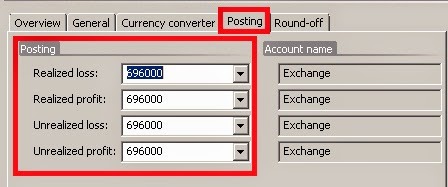
Before you can perform an exchange adjustment, the profit and loss ledger accounts for exchange adjustments must be. This setup is done in the General Ledger

Path: General ledger >> Setup >> Exchange rates >> Posting tab.

These accounts are essential to be setup in case when the organisation is dealing with multiple currencies.
Note: It is not necessary to use the same accounts for all the postings. Multiple accounts can also be used, depending on Company policy.

Revaluation process will generate unrealized gains/ losses whereas Settlement will generate realized gains/ losses.

Once these accounts are setup, the Exchange Adjustment can be carried out. These accounts must be setup for all the currencies that will be used.

Exchange Adjustment:

The procedure to run the Exchange Rate Adjustment is the same in Accounts Payable and Accounts Receivables Modules. The Exchange Adjustment is run from the Periodic Section in both the Modules.

Path: Accounts Payable >> Periodic >> Exchange Adjustment

Simulate an Exchange Adjustment:

Simulation is carried out to analyze the adjustments that will be made to the respective accounts after Revaluation. The simulation generates a report with all the entries and adjustments that will be made when the actual adjustment is carried out.

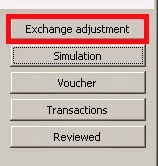
To run a Simulation, click on Simulation Button on the Exchange Adjustment Form
The following parameters need to be selected:
  • Method
  • Considered Date
  • Date of Rate

In the Method field, the following options are available:
  • Standard - Make exchange adjustments based on the Exchange rate used on the date specified in the Date of rate field.
  • Minimum - Make an exchange adjustment if a loss occurs, but not if a profit exists.
  • Invoice date - The program offsets any exchange adjustment that is not already offset, as on the date of Invoice. This causes the transaction being valued at its original value.
The Considered Date is the Date up to which the system has to fetch the “Not Settled” (Open) transactions to perform the exchange adjustment for.

The Date of Rate is the date to be considered for the exchange rate.

The default method is Standard.
The Considered Date and Date of Rate are usually the same date.

After the parameters are selected and the dates are entered, Click on OK.
The Simulation will generate a report with the adjustments that will be made if the Exchange adjustment is run. This report is used to analyze the differences and postings that will be made to the different Vendor/ Customer Accounts. 

Once the postings are verified, the Exchange Adjustment can be carried out.

Run an Exchange Adjustment:

To run the exchange adjustment, click on the Exchange Adjustment button in the form:

The parameters on the form:


Method: Standard
Considered Date and Date of Rate: As required
Use posting profile from: Select the posting profile that is used for the exchange adjustment transactions:
  • Posting – The posting profile of the vendor transaction is used.
  • Select - The posting profile is determined by the posting profile in the Posting profile field.
Posting Profile: If Select is selected in the Use posting profile from field, the posting profile of the exchange adjustment transactions is determined by the posting profile specified in this field.

Select among the posting profiles that have been set up for the company in the Posting profiles form.

Dimension: Select the kind of dimensions that are posted on the exchange adjustment transactions:
  • None - No dimensions are posted on the exchange adjustment transactions.
  • Table - The dimensions of the vendor account are posted on the exchange adjustment transactions.
  • Posting - The dimensions of the transaction that is being adjusted are posted on the exchange adjustment transactions.
Print: Select this check box to print a report with details about this run of the exchange adjustment.
This report is printed on the go and is not saved in AX for future reference.

Transaction Text and Notes: These fields are for Users to enter any remarks or comments regarding the Adjustment.

Click OK to run the Adjustment.

The Exchange Adjustments are now successfully posted.

View Exchange Adjustment Transactions:

Once the Exchange Adjustment is run, the Transactions and the Vouchers posted can be verified.

To view the Ledger Transactions posted by the Exchange Adjustment, select the Adjustment entry that was created and Click on the Voucher Button in the Exchange Adjustment Form.

In order to view the Customer or Vendor Transactions posted by the Adjustment, Click on the Transactions Button on the form.


P.S. Leave your comments below :)